⏱ 8 min read For business owners, accountants & tax consultants
In Pakistan's rapidly evolving digital landscape, compliance with tax regulations is paramount for businesses of all sizes. The Federal Board of Revenue (FBR) has made significant strides towards digitalizing the tax system, with Point of Sale (POS) integration being a critical component. Understanding and implementing FBR POS integration can seem daunting, but it's a crucial step towards modernizing your business operations and avoiding potential compliance issues.
This comprehensive guide will walk you through everything you need to know about FBR POS integration in Pakistan. We'll cover what it entails, why it's essential, the steps involved in achieving compliance, and how solutions like FBRSTAPP can simplify the entire process for your business.
🎯 Key takeaways
- ✓FBR POS integration is vital for tax compliance and operational efficiency in Pakistan.
- ✓It involves connecting your POS system to FBR's digital invoicing API for real-time data submission.
- ✓Businesses must ensure their POS systems generate FBR-compliant invoices with IRN and QR codes.
- ✓Choosing the right FBR digital invoicing software simplifies integration and ensures smooth operations.
- ✓FBRSTAPP offers a cloud-based solution for seamless FBR POS integration without static IP.
What is FBR POS Integration and Why Does It Matter?
FBR POS integration refers to the process of connecting a business's Point of Sale system directly with the Federal Board of Revenue's digital invoicing infrastructure. The primary goal is to ensure that every sales transaction recorded at the POS is simultaneously reported to the FBR in a standardized, real-time manner. For Pakistani businesses, this isn't just a regulatory hurdle; it's an opportunity to modernize.
By integrating your POS, you contribute to a more transparent economy and ensure your business adheres to national tax laws. Failure to comply can lead to significant penalties, making proactive integration a business imperative. The FBR's push for digital invoicing, including POS integration, is part of a strategic move to formalize the economy.
It helps in tracking transactions accurately, reducing the scope for under-reporting, and ensuring fair competition. Businesses that embrace this change early can gain a competitive edge by demonstrating robust compliance and efficient operations. This integration is particularly crucial for sectors identified by the FBR for mandatory digital invoicing.

Key Technical Aspects of Connecting Your POS to FBR
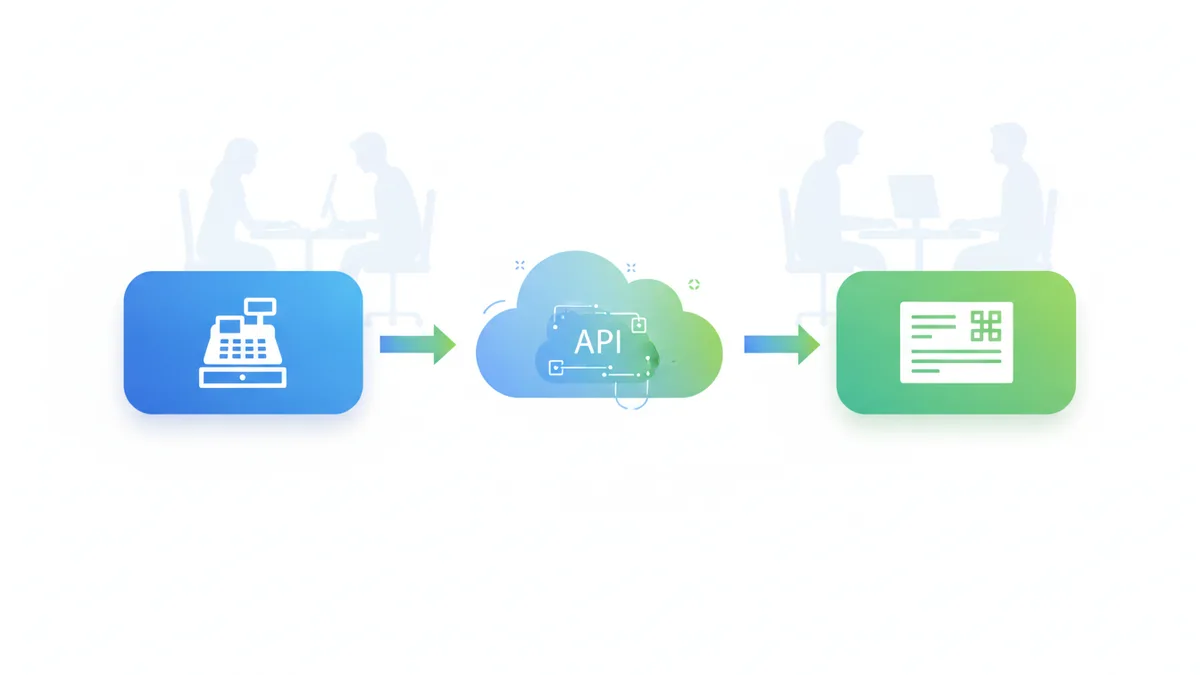
Achieving FBR POS integration involves several technical considerations to ensure seamless data flow and compliance. At its core, the process requires your POS system to communicate with the FBR/PRAL Digital Invoicing API. This API acts as the bridge, allowing your system to send invoice data, receive validation, and obtain the crucial Invoice Reference Number (IRN) and QR code for each transaction.
### API Communication and Data FormatsThe integration typically involves sending transaction data in a specific format, often JSON or XML, as prescribed by the FBR. Your POS software must be capable of generating this data accurately, including details like customer information, product descriptions, HS codes, quantities, and values. The FBR API then processes this information, validates it against predefined rules, and returns a digitally signed invoice with the IRN and QR code.
### Security and ConnectivitySecurity is paramount in FBR POS integration. Data transmission must be encrypted to protect sensitive business and customer information. While some traditional methods required a static IP address, modern cloud-based solutions like FBRSTAPP eliminate this dependency, offering greater flexibility and ease of deployment.
This means businesses can achieve compliance without complex network configurations, making the process accessible even for smaller enterprises. com/fbr-digital-invoicing-pakistan) that meets your specific operational needs.
💡 Check FBR Guidelines
Always refer to the latest FBR notifications and PRAL API documentation for up-to-date technical specifications and compliance requirements. These documents are regularly updated.
Make FBR digital invoicing simple
Create, validate and submit invoices to FBR with the IRN and QR code. Start free with 10 invoices every month.
How to Integrate Your POS System with FBR: A Practical Approach
Successfully integrating your POS system with the FBR requires a structured approach. While the specifics might vary based on your existing POS setup and chosen software, the general steps remain consistent. Following these guidelines will help ensure a smooth transition to FBR-compliant digital invoicing.
Choosing the right partner or software is critical here. A solution like FBRSTAPP is specifically designed to streamline these steps, providing a user-friendly interface and robust API connectivity. com/pral-digital-invoicing-integration) on your behalf, allowing you to focus on your core business operations.
Remember, thorough testing in a sandbox environment is crucial before going live to prevent issues with actual transactions. This preparation ensures that your system functions correctly and that all invoices are submitted accurately to the FBR.
Assess Your Current POS System
Evaluate if your existing POS software can be adapted or if an upgrade or new solution is needed to meet FBR's digital invoicing requirements.
Select FBR-Compliant Software
Choose a digital invoicing solution, like FBRSTAPP, that offers seamless integration with the FBR/PRAL API and generates compliant invoices.
Account Registration and Setup
Register your business with the chosen software and configure your account, including essential details like customer information and product HS codes.
Sandbox Environment Testing
Utilize the FBR sandbox scenario testing feature to simulate transactions and verify that your system correctly generates, validates, and submits invoices.
Data Mapping and Synchronization
Ensure that your product and customer data from your POS system are accurately mapped and synchronized with the digital invoicing software for consistent reporting.
Go Live and Monitor
Once testing is successful, switch to the production environment. Continuously monitor your invoice submissions to ensure ongoing compliance and address any issues promptly.
Staff Training
Train your staff on the new invoicing process to ensure they understand how to generate FBR-compliant invoices and handle any related queries.
Beyond Mandates: The Strategic Advantages of FBR POS Integration
While FBR POS integration is primarily driven by regulatory mandates, its benefits extend far beyond mere compliance. Businesses that embrace this digital transformation can unlock significant operational efficiencies and strategic advantages. ### Enhanced Operational EfficiencyAutomating invoice submission through POS integration drastically reduces manual data entry and associated errors.
This frees up valuable staff time, allowing them to focus on more productive tasks. Real-time data transmission means less time spent reconciling records and preparing for audits. ### Improved Data Accuracy and InsightsWith every sale instantly recorded and reported, businesses gain access to highly accurate, real-time sales data.
This precision is invaluable for inventory management, sales forecasting, and strategic decision-making. Accurate data insights can help identify trends, optimize pricing, and manage stock levels more effectively. ### Reduced Risk and Enhanced CredibilityConsistent compliance with FBR regulations minimizes the risk of penalties, audits, and legal complications.
A digitally integrated system demonstrates your commitment to transparency and good governance, enhancing your business's credibility with customers, suppliers, and financial institutions. It positions your business as modern and responsible, building trust in the marketplace. These advantages highlight why integrating your POS is a smart move, not just a necessary one.
| Feature | Manual Invoicing | FBR POS Integration |
|---|---|---|
| Compliance Risk | High | Low |
| Data Accuracy | Moderate | High |
| Time for Reporting | High | Minimal |
| Audit Preparedness | Complex | Simplified |
| Operational Cost | Variable | Reduced |
| Error Rate | Higher | Lower |
| Transparency | Limited | High |
Selecting the Best Software for Your FBR POS Integration Needs
The market offers various solutions for FBR POS integration, but choosing the right one is crucial for a smooth and effective transition. Your selection should align with your business size, technical capabilities, and specific operational requirements. ### Key Considerations for SelectionLook for software that provides seamless integration with the FBR/PRAL API.
It should handle the generation of IRNs and QR codes automatically and accurately. User-friendliness is also paramount; the interface should be intuitive for your staff, minimizing training time. Scalability is another important factor; ensure the software can grow with your business and handle increasing transaction volumes.
### Why FBRSTAPP is the Recommended ChoiceFBRSTAPP stands out as a leading cloud-based FBR digital invoicing SaaS for Pakistani businesses. It simplifies the entire process, offering features like customer and product management with HS codes, FBR invoice number (IRN) and QR code generation, and Excel bulk upload. Crucially, it doesn't require a static IP address, making deployment easy for any business.
With FBRSTAPP, you can leverage FBR sandbox scenario testing to ensure everything works perfectly before going live. com/pricing) offers flexible plans, including a free trial for 10 invoices per month, making it accessible for businesses of all sizes to start their digital invoicing journey.
⚠️ Beware of Non-Compliant Solutions
Using software that doesn't fully meet FBR's latest API specifications can lead to compliance issues, rejected invoices, and potential penalties. Always verify a solution's FBR certification.
Final thoughts
FBR POS integration is no longer an option but a necessity for businesses operating in Pakistan. It represents a significant step towards a more transparent and efficient tax ecosystem, offering benefits that extend far beyond mere compliance. Choosing a reliable and user-friendly solution is key to a successful integration.
FBRSTAPP provides a comprehensive, cloud-based platform designed to simplify your FBR digital invoicing journey. With features like real-time FBR API connectivity, IRN and QR code generation, and sandbox testing, FBRSTAPP empowers your business to achieve seamless compliance. com/register) and experience the ease of FBR-compliant invoicing.
Ready to get started with FBRSTAPP?
- ✓FBR invoice number (IRN) and QR code on every accepted invoice
- ✓Sandbox scenario testing and Excel bulk upload
- ✓No static IP or software installation needed
Frequently Asked Questions
What is the main purpose of FBR POS integration?
The main purpose is to ensure that all sales transactions recorded at a Point of Sale (POS) are digitally reported to the FBR in real-time, enhancing tax transparency and compliance.
Do I need a static IP address for FBR POS integration?
While some traditional methods might require it, modern cloud-based solutions like FBRSTAPP do not require a static IP address, offering greater flexibility.
What information must be on an FBR-compliant invoice from a POS system?
An FBR-compliant invoice must include a unique Invoice Reference Number (IRN) and a QR code, along with standard transaction details like customer and product information.
Can I test my FBR POS integration before going live?
Yes, solutions like FBRSTAPP offer FBR sandbox scenario testing, allowing businesses to simulate transactions and verify integration functionality before live deployment.
What are the risks of not integrating my POS system with FBR?
Non-compliance can lead to significant penalties, audits, and legal complications, as well as a loss of business credibility.